9.7 IPv6 Addresses and Networks
If you look back at Section 9.4, you can see that IPv4 addresses consist of 32 bits, or 4 bytes. This yields a total of roughly 4.3 billion addresses, which is insufficient for the current scale of the internet. There are several problems caused by the lack of addresses in IPv4, so in response, the Internet Engineering Task Force (IETF) developed the next version, IPv6. Before looking at more network tools, we’ll discuss the IPv6 address space.
An IPv6 address has 128 bits—32 bytes, arranged in eight sets of 4 bytes. In long form, an address is written as follows:
2001:0db8:0a0b:12f0:0000:0000:0000:8b6e
The representation is hexadecimal, with each digit ranging from 0 to f. There are a few commonly used methods of abbreviating the representation. First, you can leave out any leading zeros (for example, 0db8 becomes db8), and one—and only one—set of contiguous zero groups can become :: (two colons). Therefore, you can write the preceding address as:
2001:db8:a0b:12f0::8b6e
Subnets are still denoted in CIDR notation. For the end user, they often cover half of the available bits in the address space (/64), but there are instances where fewer are used. The portion of the address space that’s unique for each host is called the interface ID. Figure 9-3 shows the breakdown of an example address with a 64-bit subnet.
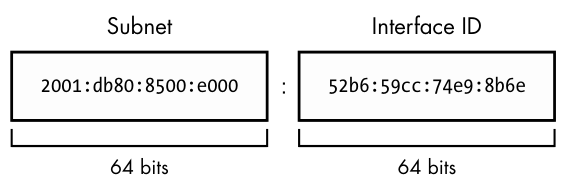
In this book, we’re generally concerned with the average user’s point of view. It’s slightly different for a service provider, where a subnet is further divided into a routing prefix and another network ID (sometimes also called a subnet). Don’t worry about this right now.
The last thing to know for now about IPv6 is that hosts normally have at least two addresses. The first, which is valid across the internet, is called the global unicast address. The second, for the local network, is called the link-local address. Link-local addresses always have an fe80::/10 prefix, followed by an all-zero 54-bit network ID, and end with a 64-bit interface ID. The result is that when you see a link-local address on your system, it will be in the fe80::/64 subnet.
Global unicast addresses have the prefix 2000::/3. Because the first byte starts with 001 with this prefix, that byte can be completed as 0010 or 0011. Therefore, a global unicast address always starts with 2 or 3.
9.7.1 Viewing IPv6 Configuration on Your System
If your system has an IPv6 configuration, you would have gotten some IPv6 information from the ip command that you ran earlier. To single out IPv6, use the -6 option:
$ ip -6 address show
1: lo: <LOOPBACK,UP,LOWER_UP> mtu 65536 state UNKNOWN qlen 1000
    inet6 ::1/128 scope host
       valid_lft forever preferred_lft forever
2: enp0s31f6: <BROADCAST,MULTICAST,UP,LOWER_UP> mtu 1500 state UP qlen 1000
    inet6 2001:db8:8500:e:52b6:59cc:74e9:8b6e/64 scope global dynamic
noprefixroute
       valid_lft 86136sec preferred_lft 86136sec
    inet6 fe80::d05c:97f9:7be8:bca/64 scope link noprefixroute
       valid_lft forever preferred_lft forever
In addition to the loopback interface (which we’ll talk about later), you can see two more addresses. The global unicast address is denoted with scope global, and the link-local address gets a scope link label.
Viewing the routes is similar:
$ ip -6 route show
::1 dev lo proto kernel metric 256 pref medium
❶ 2001:db8:8500:e::/64 dev enp0s31f6 proto ra metric 100 pref medium
❷ fe80::/64 dev enp0s31f6 proto kernel metric 100 pref medium
❸ default via fe80::800d:7bff:feb8:14a0 dev enp0s31f6 proto ra metric 100 pref
medium
This is slightly more complicated than the IPv4 setup because there are both link-local and global subnets configured. The second line ❶ is for destinations in the locally attached global unicast address subnets; the host knows that it can reach them directly, and the link-local line below ❷ is similar. For the default route ❸ (also written as ::/0 in IPv6; remember that this is anything that’s not directly connected), this configuration arranges for traffic to go through the router at the link-local address fe80::800d:7bff:feb8:14a0 instead of its address on the global subnet. You will see later that the router usually doesn’t care about how it gets traffic, only where the traffic is supposed to go. Using a link-local address as a default gateway has the advantage that it doesn’t need to change if the global IP address space changes.
9.7.2 Configuring Dual-Stack Networks
As you may have guessed by now, it’s possible to configure hosts and networks to run both IPv4 and IPv6. This is sometimes called a dual-stack network, though the use of the word stack is questionable as there’s really only one layer of the typical network stack that’s being duplicated in this case (true dual-stack would be something like IP+IPX). Pedantry aside, the IPv4 and IPv6 protocols are independent of each other and can run simultaneously. On such a host, it’s up to the application (such as a web browser) to choose IPv4 or IPv6 to connect to another host.
An application originally written for IPv4 does not automatically have IPv6 support. Fortunately, because the layers in the stack sitting on top of the network layer are unchanged, the code necessary to communicate with IPv6 is minimal and easy to add. Most important applications and servers now include IPv6 support.