9.4 The Internet Layer
Rather than start at the very bottom of the network stack with the physical layer, we’ll start at the network layer because it can be easier to understand. The internet as we currently know it is based on internet protocol versions 4 (IPv4) and 6 (IPv6). One of the most important aspects of the internet layer is that it’s meant to be a software network that places no particular requirements on hardware or operating systems. The idea is that you can send and receive internet packets over any kind of hardware, using any operating system.
Our discussion will start with IPv4 because it’s a little easier to read the addresses (and understand its limitations), but we’ll explain the primary differences in IPv6.
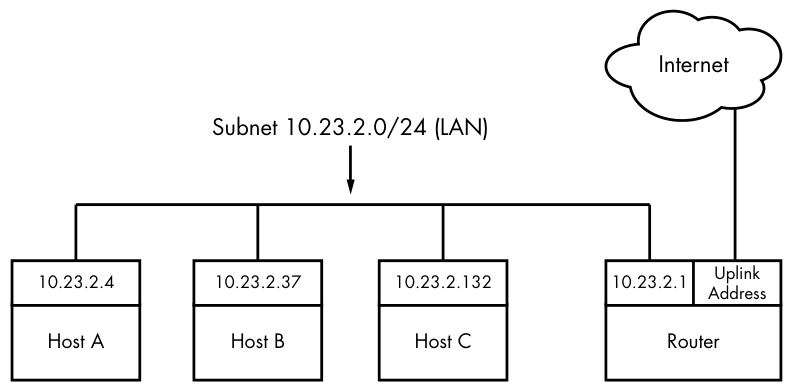
The internet’s topology is decentralized; it’s made up of smaller networks called subnets. The idea is that all subnets are interconnected in some way. For example, in Figure 9-1, the LAN is normally a single subnet.
A host can be attached to more than one subnet. As you saw in Section 9.1, that kind of host is called a router if it can transmit data from one subnet to another (another term for router is gateway). Figure 9-2 refines Figure 9-1 by identifying the LAN as a subnet, as well as internet addresses for each host and the router. The router in the figure has two addresses, the local subnet 10.23.2.1 and the link to the internet (the internet link’s address is not important right now, so it’s just labeled Uplink Address). We’ll look first at the addresses and then the subnet notation.
Each internet host has at least one numeric IP address. For IPv4, it’s in the form of a.b.c.d, such as 10.23.2.37. An address in this notation is called a dotted-quad sequence. If a host is connected to multiple subnets, it has at least one IP address per subnet. Each host’s IP address should be unique across the entire internet, but as you’ll see later, private networks and Network Address Translation (NAT) can make this a little confusing.
Don’t worry about the subnet notation in Figure 9-2 yet; we’ll discuss it shortly.
Technically, an IP address consists of 4 bytes (or 32 bits), abcd. Bytes a and d are numbers from 1 to 254, and b and c are numbers from 0 to 255. A computer processes IP addresses as raw bytes. However, it’s much easier for a human to read and write a dotted-quad address, such as 10.23.2.37, instead of something ugly like the hexadecimal 0x0A170225.
IP addresses are like postal addresses in some ways. To communicate with another host, your machine must know that other host’s IP address.
Let’s take a look at the address on your machine.
9.4.1 Viewing IP Addresses
One machine can have many IP addresses, accommodating multiple physical interfaces, virtual internal networks, and more. To see the addresses that are active on your Linux machine, run:
$ ip address show
There will probably be a lot of output (grouped by physical interface, covered in Section 9.10), but it should include something like this:
2: enp0s31f6: <BROADCAST,MULTICAST,UP,LOWER_UP> mtu 1500 qdisc fq_codel state
UP group default qlen 1000
    link/ether 40:8d:5c:fc:24:1f brd ff:ff:ff:ff:ff:ff
    inet 10.23.2.4/24 brd 10.23.2.255 scope global noprefixroute enp0s31f6
       valid_lft forever preferred_lft forever
The ip command’s output includes many details from the internet layer(s) and the physical layer. (Sometimes it doesn’t even include an internet address at all!) We’ll discuss the output in more detail later, but for now, concentrate on the fourth line, which reports that the host is configured to have an IPv4 address (denoted with inet) of 10.23.2.4. The /24 after the address helps define the subnet that the IP address belongs to. Let’s see how that works.
The ip command is the current standard network configuration tool. In other documentation, you may see the ifconfig command. This older command has been in use in other versions of Unix for decades, but is less capable. For consistency with contemporary recommended practice (and distributions that may not even include ifconfig by default), we’ll use ip. Some other tools that ip supplants are route and arp.
9.4.2 Subnets
A subnet, defined previously, is a connected group of hosts with IP addresses in a particular range. For example, the hosts in the range 10.23.2.1 to 10.23.2.254 could comprise a subnet, as could all hosts between 10.23.1.1 and 10.23.255.254. Usually, the subnet hosts are on the same physical network, as shown in Figure 9-2.
You define a subnet with two pieces: a network prefix (also called a routing prefix) and a subnet mask (sometimes called the network mask or routing mask). Let’s say you want to create a subnet containing the IP addresses between 10.23.2.1 and 10.23.2.254. The network prefix is the part that is common to all addresses in the subnet; in this example, it’s 10.23.2.0 with a subnet mask of 255.255.255.0. Let’s see where those numbers come from.
To see how the prefix and mask work together to give you all possible IP addresses on a subnet, we’ll look at the binary form. The mask marks the bit locations in an IP address that are common to the subnet. For example, here are the binary forms of 10.23.2.0 and 255.255.255.0.
10.23.2.0:        00001010 00010111 00000010 00000000
255.255.255.0:    11111111 11111111 11111111 00000000
Now, let’s use boldface to mark the bit locations in 10.23.2.0 that are 1s in 255.255.255.0:
10.23.2.0: 00001010 00010111 00000010 00000000
Any address containing the bit configuration in bold is in the subnet. Looking at the bits that are not in bold (the last set of eight 0s), setting any number of these bits to 1 results in a valid IP address in this subnet, with the exception of all 0s or all 1s.
Putting it all together, you can see how a host with an IP address of 10.23.2.1 and a subnet mask of 255.255.255.0 is on the same subnet as any other computer that has an IP address beginning with 10.23.2. You can denote this entire subnet as 10.23.2.0/255.255.255.0.
Now let’s see how this becomes the shorthand notation (such as /24) that you’ve seen from tools such as ip.
9.4.3 Common Subnet Masks and CIDR Notation
In most internet tools, you’ll encounter a different form of subnet representation called Classless Inter-Domain Routing (CIDR) notation, where a subnet such as 10.23.2.0/255.255.255.0 is written as 10.23.2.0/24. This shorthand takes advantage of the simple pattern that subnet masks follow.
Look at the mask in binary form, as in the example you saw in the preceding section. You’ll find that all subnet masks are (or should be, according to RFC 1812) just one block of 1s followed by one block of 0s. For example, you just saw that 255.255.255.0 in binary form is 24 1-bits followed by 8 0-bits. The CIDR notation identifies the subnet mask by the number of leading 1s in the subnet mask. Therefore, a combination such as 10.23.2.0/24 includes both the subnet prefix and its subnet mask.
Table 9-1 shows several example subnet masks and their CIDR forms. The /24 subnet mask is the most common on local end-user networks; it’s often used in combination with one of the private networks that you’ll see in Section 9.22.
Table 9-1: Subnet Masks
| Long form | CIDR form |
|---|---|
| 255.0.0.0 | /8 |
| 255.255.0.0 | /16 |
| 255.240.0.0 | /12 |
| 255.255.255.0 | /24 |
| 255.255.255.192 | /26 |
If you aren’t familiar with conversion between decimal, binary, and hexadecimal formats, you can use a calculator utility such as bc or dc to convert between different radix representations. For example, in bc, you can run the command obase=2; 240 to print the number 240 in binary (base 2) form.
Taking this one step further, you might have already noticed that if you’ve got the IP address and the subnet mask, you don’t even need to bother with a separate network definition. You can combine them, as you saw back in Section 9.4.1; the ip address show output included 10.23.2.4/24.
Identifying subnets and their hosts is the first building block to understanding how the internet works. However, you still need to connect the subnets.