Chapter 1: The Big Picture
At first glance, a contemporary operating system such as Linux is very complicated, with a dizzying number of pieces simultaneously running and communicating. For example, a web server can talk to a database server, which could in turn use a shared library that many other programs use. How does all of this manage to work, and how can you make sense of any of it?
The most effective way to understand how an operating system works is through abstraction—a fancy way of saying that you can ignore most of the details that make up a piece that you’re trying to understand, and concentrate instead on its basic purpose and operation. For example, when you ride in a car, you normally don’t need to think about details such as the mounting bolts that hold the motor inside the car or the people who build and maintain the road upon which the car drives. All you really need to know is what the car does (transports you somewhere else) and a few basics about how to use it (how to operate the door and seat belt).
This level of abstraction might work if you’re just a passenger in the car. But if you also need to drive it, you have to dig deeper and break up your abstraction into a few parts. You now expand your knowledge in three areas: the car itself (such as its size and capabilities), how to operate the controls (steering wheel, accelerator pedal, and so on), and the features of the road.
Abstraction can be a great help when you’re trying to find and fix problems. For example, let’s say you’re driving a car and the ride is rough. You can quickly assess the three basic car-related abstractions just mentioned to determine the source of the problem. It should be fairly easy to eliminate the first two abstractions (your car or the way you’re driving) if neither is the issue, so you can narrow the problem down to the road itself. You’ll probably find that the road is bumpy. Now, if you want, you can dig deeper into your abstraction of the road and find out why the road has deteriorated or, if the road is new, why the construction workers did a lousy job.
Software developers use abstraction as a tool when building an operating system and its applications. There are many terms for an abstracted subdivision in computer software—including subsystem, module, and package—but we’ll use the term component in this chapter because it’s simple. When building a software component, developers typically don’t think much about the internal structure of other components, but they do consider other components they can use (so that they don’t have to write any additional unnecessary software) and how to use them.
This chapter provides a high-level overview of the components that make up a Linux system. Although each one has a tremendous number of technical details in its internal makeup, we’re going to ignore these details and concentrate on what the components do in relation to the whole system. We’ll look at the details in subsequent chapters.
1.1 Levels and Layers of Abstraction in a Linux System
Using abstraction to split computing systems into components makes things easier to understand, but it doesn’t work without organization. We arrange components into layers or levels, classifications (or groupings) of components according to where the components sit between the user and the hardware. Web browsers, games, and such sit at the top layer; at the bottom layer we have the memory in the computer hardware—the 0s and 1s. The operating system occupies many of the layers in between.
A Linux system has three main levels. Figure 1-1 shows these levels and some of the components inside each level. The hardware is at the base. Hardware includes the memory as well as one or more central processing units (CPUs) to perform computation and to read from and write to memory. Devices such as disks and network interfaces are also part of the hardware.
The next level up is the kernel, which is the core of the operating system. The kernel is software residing in memory that tells the CPU where to look for its next task. Acting as a mediator, the kernel manages the hardware (especially main memory) and is the primary interface between the hardware and any running program.
Processes—the running programs that the kernel manages—collectively make up the system’s upper level, called user space. (A more specific term for process is user process, regardless of whether a user directly interacts with the process. For example, all web servers run as user processes.)
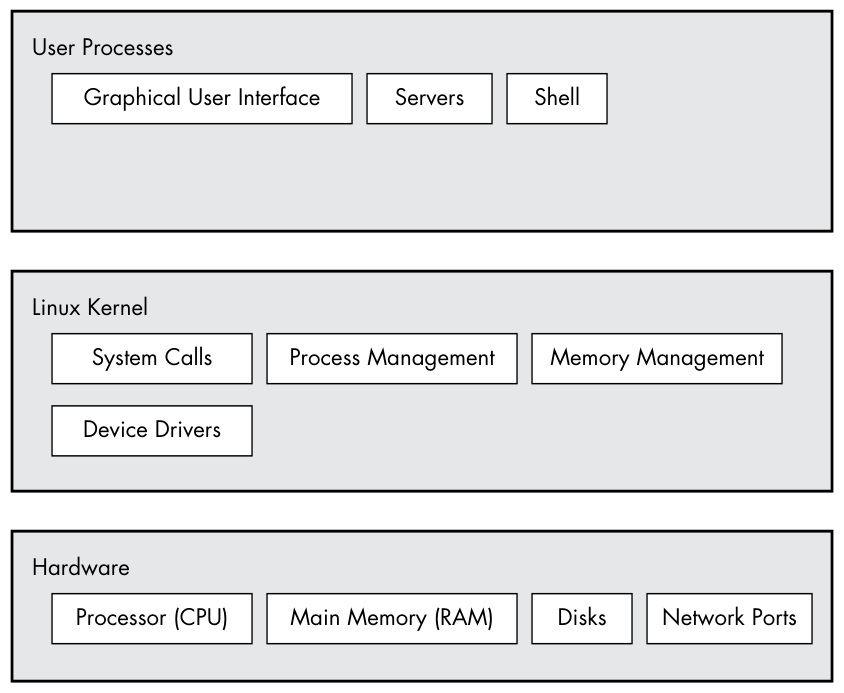
There is a critical difference between how the kernel and the user processes run: the kernel runs in kernel mode, and the user processes run in user mode. Code running in kernel mode has unrestricted access to the processor and main memory. This is a powerful but dangerous privilege that allows the kernel to easily corrupt and crash the entire system. The memory area that only the kernel can access is called kernel space.
User mode, in comparison, restricts access to a (usually quite small) subset of memory and safe CPU operations. User space refers to the parts of main memory that the user processes can access. If a process makes a mistake and crashes, the consequences are limited and can be cleaned up by the kernel. This means that if your web browser crashes, it probably won’t take down the scientific computation that has been running in the background for days.
In theory, a user process gone haywire can’t cause serious damage to the rest of the system. In reality, it depends on what you consider “serious damage,” as well as the particular privileges of the process, because some processes are allowed to do more than others. For example, can a user process completely wreck the data on a disk? With the correct permissions, yes—and you might consider this to be fairly dangerous. There are safeguards to prevent this, however, and most processes simply aren’t allowed to wreak havoc in this manner.
The Linux kernel can run kernel threads, which look much like processes but have access to kernel space. Some examples are kthreadd and kblockd.
1.2 Hardware: Understanding Main Memory
Of all of the hardware on a computer system, main memory is perhaps the most important. In its rawest form, main memory is just a big storage area for a bunch of 0s and 1s. Each slot for a 0 or 1 is called a bit. This is where the running kernel and processes reside—they’re just big collections of bits. All input and output from peripheral devices flows through main memory, also as a bunch of bits. A CPU is just an operator on memory; it reads its instructions and data from the memory and writes data back out to the memory.
You’ll often hear the term state in reference to memory, processes, the kernel, and other parts of a computer system. Strictly speaking, a state is a particular arrangement of bits. For example, if you have four bits in your memory, 0110, 0001, and 1011 represent three different states.
When you consider that a single process can easily consist of millions of bits in memory, it’s often easier to use abstract terms when talking about states. Instead of describing a state using bits, you describe what something has done or is doing at the moment. For example, you might say, “The process is waiting for input” or, “The process is performing Stage 2 of its startup.”
Because it’s common to refer to the state in abstract terms rather than to the actual bits, the term image refers to a particular physical arrangement of bits.
1.3 The Kernel
Why are we talking about main memory and states? Nearly everything that the kernel does revolves around main memory. One of the kernel’s tasks is to split memory into many subdivisions, and it must maintain certain state information about those subdivisions at all times. Each process gets its own share of memory, and the kernel must ensure that each process keeps to its share.
The kernel is in charge of managing tasks in four general system areas:
Processes The kernel is responsible for determining which processes are allowed to use the CPU.
Memory The kernel needs to keep track of all memory—what is currently allocated to a particular process, what might be shared between processes, and what is free.
Device drivers The kernel acts as an interface between hardware (such as a disk) and processes. It’s usually the kernel’s job to operate the hardware.
System calls and support Processes normally use system calls to communicate with the kernel.
We’ll now briefly explore each of these areas.
If you’re interested in the detailed workings of a kernel, two good textbooks are Operating System Concepts, 10th edition, by Abraham Silberschatz, Peter B. Galvin, and Greg Gagne (Wiley, 2018), and Modern Operating Systems, 4th edition, by Andrew S. Tanenbaum and Herbert Bos (Prentice Hall, 2014).
1.3.1 Process Management
Process management describes the starting, pausing, resuming, scheduling, and terminating of processes. The concepts behind starting and terminating processes are fairly straightforward, but describing how a process uses the CPU in its normal course of operation is a bit more complex.
On any modern operating system, many processes run “simultaneously.” For example, you might have a web browser and a spreadsheet open on a desktop computer at the same time. However, things are not as they appear: the processes behind these applications typically do not run at exactly the same time.
Consider a system with a one-core CPU. Many processes may be able to use the CPU, but only one process can actually use the CPU at any given time. In practice, each process uses the CPU for a small fraction of a second, then pauses; then another process uses the CPU for another small fraction of a second; then another process takes a turn, and so on. The act of one process giving up control of the CPU to another process is called a context switch.
Each piece of time—called a time slice—gives a process enough time for significant computation (and indeed, a process often finishes its current task during a single slice). However, because the slices are so small, humans can’t perceive them, and the system appears to be running multiple processes at the same time (a capability known as multitasking).
The kernel is responsible for context switching. To understand how this works, let’s think about a situation in which a process is running in user mode but its time slice is up. Here’s what happens:
- The CPU (the actual hardware) interrupts the current process based on an internal timer, switches into kernel mode, and hands control back to the kernel.
- The kernel records the current state of the CPU and memory, which will be essential to resuming the process that was just interrupted.
- The kernel performs any tasks that might have come up during the preceding time slice (such as collecting data from input and output, or I/O, operations).
- The kernel is now ready to let another process run. The kernel analyzes the list of processes that are ready to run and chooses one.
- The kernel prepares the memory for this new process and then prepares the CPU.
- The kernel tells the CPU how long the time slice for the new process will last.
- The kernel switches the CPU into user mode and hands control of the CPU to the process.
The context switch answers the important question of when the kernel runs. The answer is that it runs between process time slices during a context switch.
In the case of a multi-CPU system, as most current machines are, things become slightly more complicated because the kernel doesn’t need to relinquish control of its current CPU in order to allow a process to run on a different CPU, and more than one process may run at a time. However, to maximize the usage of all available CPUs, the kernel typically performs these steps anyway (and may use certain tricks to grab a little more CPU time for itself).
1.3.2 Memory Management
The kernel must manage memory during a context switch, which can be a complex job. The following conditions must hold:
- The kernel must have its own private area in memory that user processes can’t access.
- Each user process needs its own section of memory.
- One user process may not access the private memory of another process.
- User processes can share memory.
- Some memory in user processes can be read-only.
- The system can use more memory than is physically present by using disk space as auxiliary.
Fortunately for the kernel, there is help. Modern CPUs include a memory management unit (MMU) that enables a memory access scheme called virtual memory. When using virtual memory, a process does not directly access the memory by its physical location in the hardware. Instead, the kernel sets up each process to act as if it had an entire machine to itself. When the process accesses some of its memory, the MMU intercepts the access and uses a memory address map to translate the memory location from the process point of view into an actual physical memory location in the machine. The kernel must still initialize and continuously maintain and alter this memory address map. For example, during a context switch, the kernel has to change the map from the outgoing process to the incoming process.
The implementation of a memory address map is called a page table.
You’ll learn more about how to view memory performance in Chapter 8.
1.3.3 Device Drivers and Management
The kernel’s role with devices is relatively simple. A device is typically accessible only in kernel mode because improper access (such as a user process asking to turn off the power) could crash the machine. A notable difficulty p. 7 is that different devices rarely have the same programming interface, even if the devices perform the same task (for example, two different network cards). Therefore, device drivers have traditionally been part of the kernel, and they strive to present a uniform interface to user processes in order to simplify the software developer’s job.
1.3.4 System Calls and Support
There are several other kinds of kernel features available to user processes. For example, system calls (or syscalls) perform specific tasks that a user process alone cannot do well or at all. For example, the acts of opening, reading, and writing files all involve system calls.
Two system calls, fork() and exec(), are important to understanding how processes start:
fork() When a process calls fork(), the kernel creates a nearly identical copy of the process.
exec() When a process calls exec(program), the kernel loads and starts program, replacing the current process.
Other than init (see Chapter 6), all new user processes on a Linux system start as a result of fork(), and most of the time, you also run exec() to start a new program instead of running a copy of an existing process. A very simple example is any program that you run at the command line, such as the ls command to show the contents of a directory. When you enter ls into a terminal window, the shell that’s running inside the terminal window calls fork() to create a copy of the shell, and then the new copy of the shell calls exec(ls) to run ls. Figure 1-2 shows the flow of processes and system calls for starting a program like ls.

System calls are normally denoted with parentheses. In the example shown in Figure 1-2, the process asking the kernel to create another process must perform a fork() system call. This notation derives from the way the call would be written in the C programming language. You don’t need to know C to understand this book; just remember that a system call is an interaction between a process and the kernel. In addition, this book simplifies certain groups of system calls. For example, exec() refers to an entire family of system calls that all perform a similar task but differ in programming. There is also a variant on a process called a thread, which we’ll cover in Chapter 8.
The kernel also supports user processes with features other than traditional system calls, the most common of which are pseudodevices. Pseudodevices look like devices to user processes, but they’re implemented purely in software. This means they don’t technically need to be in the kernel, but they are usually there for practical reasons. For example, the kernel random number generator device (/dev/random) would be difficult to implement securely with a user process.
Technically, a user process that accesses a pseudodevice must use a system call to open the device, so processes can’t entirely avoid system calls.
1.4 User Space
As mentioned earlier, the main memory that the kernel allocates for user processes is called user space. Because a process is simply a state (or image) in memory, user space also refers to the memory for the entire collection of running processes. (You may also hear the more informal term userland used for user space; sometimes this also means the programs running in user space.)
Most of the real action on a Linux system happens in user space. Though all processes are essentially equal from the kernel’s point of view, they perform different tasks for users. There is a rudimentary service level (or layer) structure to the kinds of system components that user processes represent. Figure 1-3 shows how an example set of components fit together and interact on a Linux system. Basic services are at the bottom level (closest to the kernel), utility services are in the middle, and applications that users touch are at the top. Figure 1-3 is a greatly simplified diagram because only six components are shown, but you can see that the components at the top are closest to the user (the user interface and web browser); the components in the middle level include a domain name caching server that the web browser uses; and there are several smaller components at the bottom.
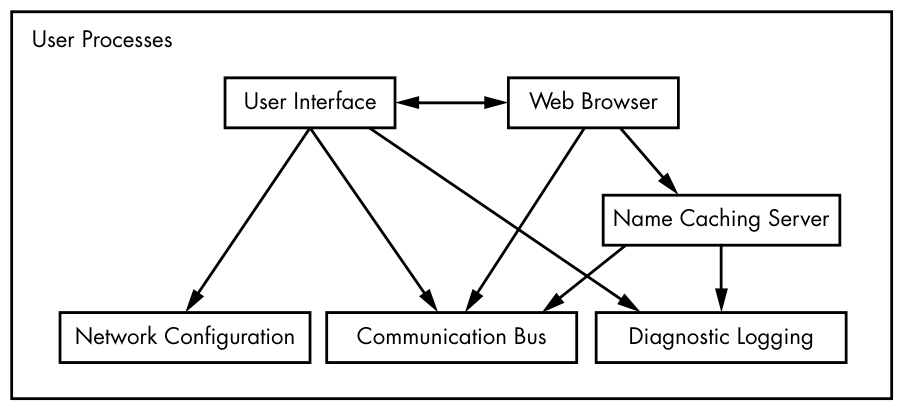
The bottom level tends to consist of small components that perform single, uncomplicated tasks. The middle level has larger components such as mail, print, and database services. Finally, components at the top level perform complicated tasks that the user often controls directly. Components also use other components. Generally, if one component wants to use another, the second component is either at the same service level or below.
However, Figure 1-3 is only an approximation of the arrangement of user space. In reality, there are no rules in user space. For example, most applications and services write diagnostic messages known as logs. Most programs use the standard syslog service to write log messages, but some prefer to do all of the logging themselves.
In addition, it’s difficult to categorize some user-space components. Server components such as web and database servers can be considered very high-level applications because their tasks are often complicated, so you might place these at the top level in Figure 1-3. However, user applications may depend on these servers to perform tasks that they’d rather not do themselves, so you could also make a case for placing them at the middle level.
1.5 Users
The Linux kernel supports the traditional concept of a Unix user. A user is an entity that can run processes and own files. A user is most often associated with a username; for example, a system could have a user named billyjoe. However, the kernel does not manage the usernames; instead, it identifies users by simple numeric identifiers called user IDs. (You’ll learn more about how usernames correspond to user IDs in Chapter 7.)
Users exist primarily to support permissions and boundaries. Every user-space process has a user owner, and processes are said to run as the owner. A user may terminate or modify the behavior of its own processes (within certain limits), but it cannot interfere with other users’ processes. In addition, users may own files and choose whether to share them with other users.
A Linux system normally has a number of users in addition to the ones that correspond to the real human beings who use the system. You’ll read about these in more detail in Chapter 3, but the most important user to know about is root. The root user is an exception to the preceding rules because root may terminate and alter another user’s processes and access any file on the local system. For this reason, root is known as the superuser. A person who can operate as root—that is, who has root access—is an administrator on a traditional Unix system.
Operating as root can be dangerous. It can be difficult to identify and correct mistakes because the system will let you do anything, even if it is harmful to the system. For this reason, system designers constantly try to make root access as unnecessary as possible—for example, by not requiring root access to switch between wireless networks on a notebook. In addition, as powerful as the root user is, it still runs in the operating system’s user mode, not kernel mode.
Groups are sets of users. The primary purpose of groups is to allow a user to share file access to other members of a group.
1.6 Looking Forward
So far, you’ve seen what constitutes a running Linux system. User processes make up the environment that you directly interact with; the kernel manages processes and hardware. Both the kernel and processes reside in memory.
This is great background information, but you can’t learn the details of a Linux system by reading about it alone; you need to get your hands dirty. The next chapter starts your journey by teaching you some user-space basics. Along the way, you’ll learn about a major part of the Linux system that this chapter doesn’t discuss: long-term storage (disks, files, and the like). After all, you need to store your programs and data somewhere.