1.4 User Space
As mentioned earlier, the main memory that the kernel allocates for user processes is called user space. Because a process is simply a state (or image) in memory, user space also refers to the memory for the entire collection of running processes. (You may also hear the more informal term userland used for user space; sometimes this also means the programs running in user space.)
Most of the real action on a Linux system happens in user space. Though all processes are essentially equal from the kernel’s point of view, they perform different tasks for users. There is a rudimentary service level (or layer) structure to the kinds of system components that user processes represent. Figure 1-3 shows how an example set of components fit together and interact on a Linux system. Basic services are at the bottom level (closest to the kernel), utility services are in the middle, and applications that users touch are at the top. Figure 1-3 is a greatly simplified diagram because only six components are shown, but you can see that the components at the top are closest to the user (the user interface and web browser); the components in the middle level include a domain name caching server that the web browser uses; and there are several smaller components at the bottom.
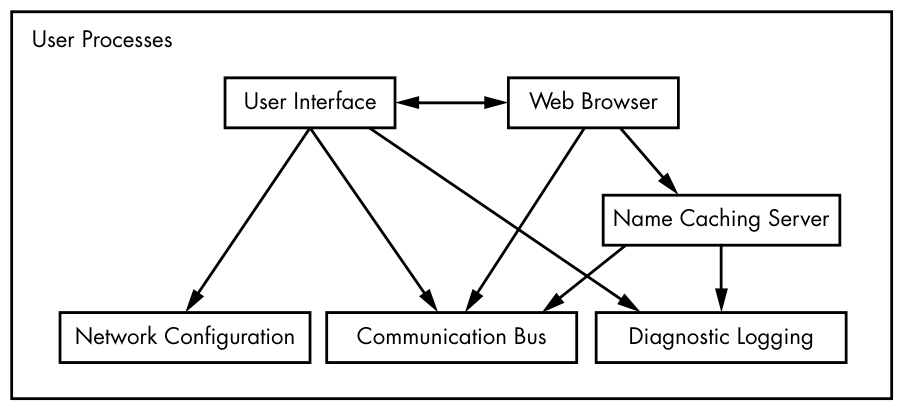
The bottom level tends to consist of small components that perform single, uncomplicated tasks. The middle level has larger components such as mail, print, and database services. Finally, components at the top level perform complicated tasks that the user often controls directly. Components also use other components. Generally, if one component wants to use another, the second component is either at the same service level or below.
However, Figure 1-3 is only an approximation of the arrangement of user space. In reality, there are no rules in user space. For example, most applications and services write diagnostic messages known as logs. Most programs use the standard syslog service to write log messages, but some prefer to do all of the logging themselves.
In addition, it’s difficult to categorize some user-space components. Server components such as web and database servers can be considered very high-level applications because their tasks are often complicated, so you might place these at the top level in Figure 1-3. However, user applications may depend on these servers to perform tasks that they’d rather not do themselves, so you could also make a case for placing them at the middle level.