9.21 Configuring Linux as a Router
Routers are just computers with more than one physical network interface. You can easily configure a Linux machine to be a router.
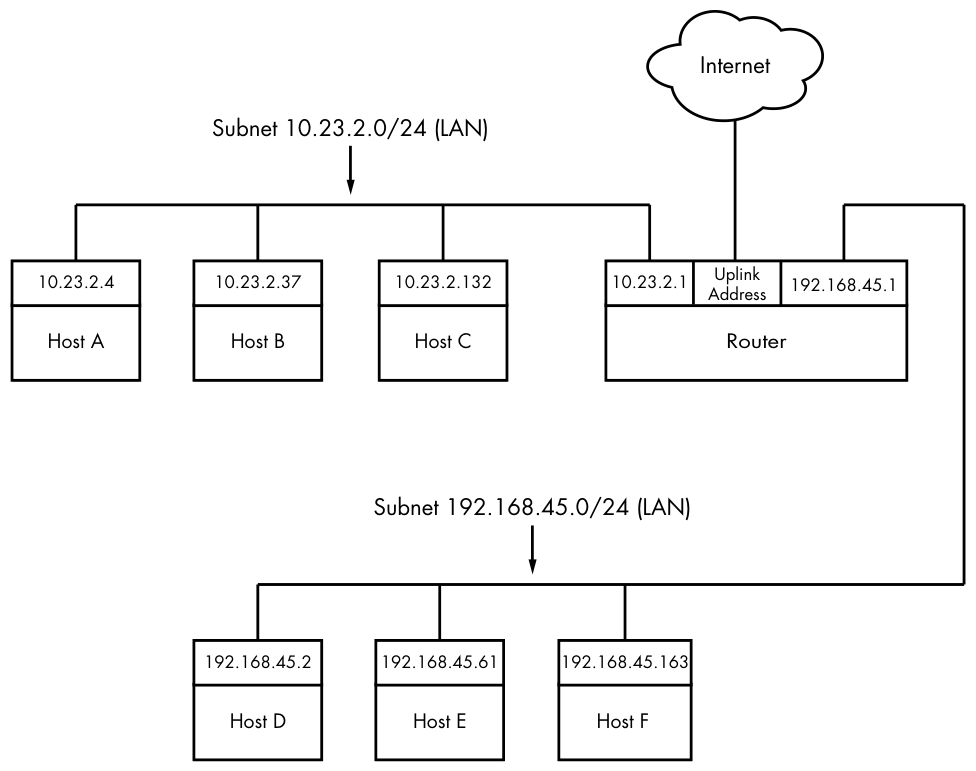
Let’s look at an example. Say you have two LAN subnets, 10.23.2.0/24 and 192.168.45.0/24. To connect them, you have a Linux router machine with three network interfaces: two for the LAN subnets and one for an internet uplink, as shown in Figure 9-5.
As you can see, this doesn’t look very different from the simple network example used in the rest of this chapter. The router’s IP addresses for the LAN subnets are 10.23.2.1 and 192.168.45.1. When those addresses are configured, the routing table looks something like this (the interface names might vary in practice; ignore the internet uplink for now):
# ip route show
10.23.2.0/24 dev enp0s31f6 proto kernel scope link src 10.23.2.1 metric 100
192.168.45.0/24 dev enp0s1 proto kernel scope link src 192.168.45.1 metric 100
Now let’s say that the hosts on each subnet have the router as their default gateway (10.23.2.1 for 10.23.2.0/24 and 192.168.45.1 for 192.168.45.0/24). If 10.23.2.4 wants to send a packet to anything outside of 10.23.2.0/24, it passes the packet to 10.23.2.1. For example, to send a packet from 10.23.2.4 (Host A) to 192.168.45.61 (Host E), the packet goes to 10.23.2.1 (the router) via its enp0s31f6 interface, then back out through the router’s enp0s1 interface.
However, in some basic configurations, the Linux kernel does not automatically move packets from one subnet to another. To enable this basic routing function, you need to enable IP forwarding in the router’s kernel with this command:
# sysctl -w net.ipv4.ip_forward=1
As soon as you enter this command, the machine should start routing packets between subnets, assuming that the hosts on those subnets know to send their packets to the router you just created.
You can check the status of IP forwarding with the sysctl net.ipv4.ip_forward command.
To make this change permanent upon reboot, you can add it to your /etc/sysctl.conf file. Depending on your distribution, you may have the option to put it into a file in /etc/sysctl.d so that distribution updates won’t overwrite your changes.
When the router also has the third network interface with an internet uplink, this same setup allows internet access for all hosts on both subnets because they’re configured to use the router as the default gateway. But that’s where things get more complicated. The problem is that certain IPv4 p. 256 addresses such as 10.23.2.4 are not actually visible to the whole internet; they’re on so-called private networks. To provide for internet connectivity, you must set up a feature called Network Address Translation (NAT) on the router. The software on nearly all specialized routers does this, so there’s nothing out of the ordinary here, but let’s examine the problem of private networks in a bit more detail.