9.25 Firewalls
Routers should always include some kind of firewall to keep undesirable traffic out of your network. A firewall is a software and/or hardware configuration that usually sits on a router between the internet and a smaller network, attempting to ensure that nothing “bad” from the internet harms the smaller network. You can also set up firewall features on any host to screen all incoming and outgoing data at the packet level (as opposed to at the application layer, where server programs usually try to perform some access control of their own). Firewalling on individual machines is sometimes called IP filtering.
A system can filter packets when it receives a packet, sends a packet, or forwards (routes) a packet to another host or gateway.
With no firewalling in place, a system just processes packets and sends them on their way. Firewalls put checkpoints for packets at the points of data transfer just identified. The checkpoints drop, reject, or accept packets, usually based on some of these criteria:
- The source or destination IP address or subnet
- The source or destination port (in the transport layer information)
- The firewall’s network interface
Firewalls provide an opportunity to work with the subsystem of the Linux kernel that processes IP packets. Let’s look at that now.
9.25.1 Linux Firewall Basics
In Linux, you create firewall rules in a series known as a chain. A set of chains makes up a table. As a packet moves through the various parts of the Linux networking subsystem, the kernel applies the rules in certain chains to the packets. For example, a new packet arriving from the physical layer is classified by the kernel as “input,” so it activates rules in chains corresponding to input.
All of these data structures are maintained by the kernel. The whole system is called iptables, with an iptables user-space command to create and manipulate the rules.
There’s a newer system called nftables that is meant to replace iptables, but as of this writing, iptables is still the most widely used system. The command to administer nftables is nft, and there’s an iptables-to-nftables translator called iptables-translate for the iptables commands shown in this book. To make things even more complicated, a system called bpfilter has been recently introduced with a different approach. Try not to get bogged down with the specifics of commands—it’s the effects that matter.
Because there can be many tables—each with its own sets of chains, which in turn can contain many rules—packet flow can become quite complicated. However, you’ll normally work primarily with a single table named filter that controls basic packet flow. There are three basic chains in the filter table: INPUT for incoming packets, OUTPUT for outgoing packets, and FORWARD for routed packets.
Figures 9-6 and 9-7 show simplified flowcharts for where rules are applied to packets in the filter table. There are two figures because packets can either come into the system from a network interface (Figure 9-6) or be generated by a local process (Figure 9-7).
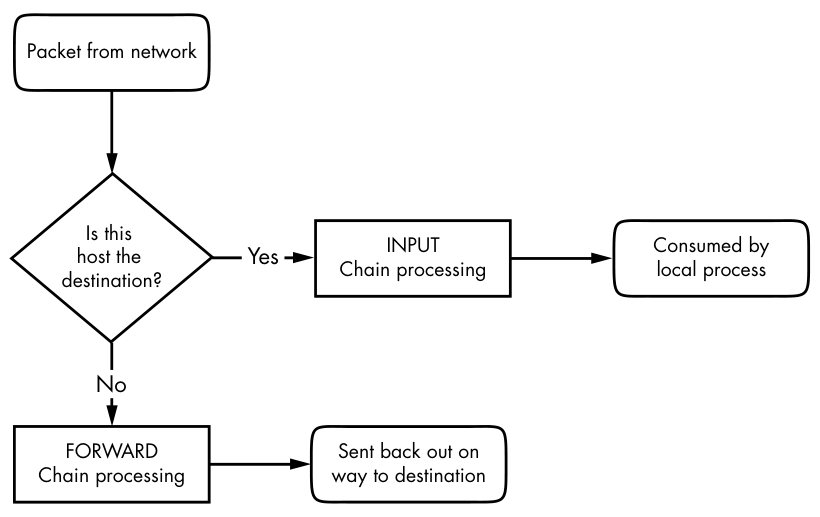

As you can see, an incoming packet from the network can be consumed by a user process and may not reach the FORWARD chain or the OUTPUT chain. Packets generated by user processes won’t reach the INPUT or FORWARD chains.
This gets more complicated because there are many steps along the way other than just these three chains. For example, packets are subject to PREROUTING and POSTROUTING chains, and chain processing can also occur at any of the three lower network levels. For a big diagram of everything that’s going on, search the internet for “Linux netfilter packet flow,” but remember that these diagrams try to include every possible scenario for packet input and flow. It often helps to break the diagrams down by packet source, as in Figures 9-6 and 9-7.
9.25.2 Setting Firewall Rules
Let’s look at how the iptables system works in practice. Start by viewing the current configuration with this command:
# iptables -L
The output is usually an empty set of chains, as follows:
Chain INPUT (policy ACCEPT)
target     prot opt source               destination

Chain FORWARD (policy ACCEPT)
target     prot opt source               destination

Chain OUTPUT (policy ACCEPT)
target     prot opt source               destination
Each firewall chain has a default policy that specifies what to do with a packet if no rule matches the packet. The policy for all three chains in this example is ACCEPT, meaning that the kernel allows the packet to pass through the packet-filtering system. The DROP policy tells the kernel to discard the packet. To set the policy on a chain, use iptables -P like this:
# iptables -P FORWARD DROP
Don’t do anything rash with the policies on your machine until you’ve read through the rest of this section.
Say that someone at 192.168.34.63 is annoying you. To prevent them from talking to your machine, run this command:
# iptables -A INPUT -s 192.168.34.63 -j DROP
The -A INPUT parameter appends a rule to the INPUT chain. The -s 192.168.34.63 part specifies the source IP address in the rule, and -j DROP tells the kernel to discard any packet matching the rule. Therefore, your machine will throw out any packet coming from 192.168.34.63.
To see the rule in place, run iptables -L again:
Chain INPUT (policy ACCEPT)
target     prot opt source               destination
DROP       all  --  192.168.34.63        anywhere
Unfortunately, your friend at 192.168.34.63 has told everyone on his subnet to open connections to your SMTP port (TCP port 25). To get rid of that traffic as well, run:
# iptables -A INPUT -s 192.168.34.0/24 -p tcp --destination-port 25 -j DROP
This example adds a netmask qualifier to the source address as well as -p tcp to specify TCP packets only. A further restriction, --destination-port 25, says that the rule should apply only to traffic to port 25. The IP table list for INPUT now looks like this:
Chain INPUT (policy ACCEPT)
target     prot opt source               destination
DROP       all  --  192.168.34.63        anywhere
DROP       tcp  --  192.168.34.0/24      anywhere           tcp dpt:smtp
All is well until you hear from someone you know at 192.168.34.37 saying that she can’t send you email because you blocked her machine. Thinking this is a quick fix, you run this command:
# iptables -A INPUT -s 192.168.34.37 -j ACCEPT
However, it doesn’t work. To see why, look at the new chain:
Chain INPUT (policy ACCEPT)
target     prot opt source               destination
DROP       all  --  192.168.34.63        anywhere
DROP       tcp  --  192.168.34.0/24      anywhere           tcp dpt:smtp
ACCEPT     all  --  192.168.34.37        anywhere
The kernel reads the chain from top to bottom, using the first rule that matches.
The first rule does not match 192.168.34.37, but the second does, because it applies to all hosts from 192.168.34.1 to 192.168.34.254 and this second rule says to drop packets. When a rule matches, the kernel carries out the action and looks no further down in the chain. (You might notice that 192.168.34.37 can send packets to any port on your machine except port 25 because the second rule applies only to port 25.)
The solution is to move the third rule to the top. First, delete the third rule with this command:
# iptables -D INPUT 3
Then insert that rule at the top of the chain with iptables -I:
# iptables -I INPUT -s 192.168.34.37 -j ACCEPT
To insert a rule elsewhere in a chain, put the rule number after the chain name (for example, iptables -I INPUT 4 ...).
9.25.3 Firewall Strategies
Although the preceding tutorial showed you how to insert rules and how the kernel processes IP chains, you haven’t seen firewall strategies that actually work. Let’s talk about that now.
There are two basic kinds of firewall scenarios: one for protecting individual machines (where you set rules in each machine’s INPUT chain) and one for protecting a network of machines (where you set rules in the router’s FORWARD chain). In both cases, you can’t have serious security if you use a default policy of ACCEPT and continuously insert rules to drop packets from sources that start to send bad stuff. You must allow only the packets that you trust, and deny everything else.
For example, say your machine has an SSH server on TCP port 22. There’s no reason for any random host to initiate a connection to any other port on your machine, and you shouldn’t give any such host a chance. To set that up, first set the INPUT chain policy to DROP:
# iptables -P INPUT DROP
To enable ICMP traffic (for ping and other utilities), use this line:
# iptables -A INPUT -p icmp -j ACCEPT
Make sure that you can receive packets you send to both your own network IP address and 127.0.0.1 (localhost). Assuming your host’s IP address is my_addr, do this:
# iptables -A INPUT -s 127.0.0.1 -j ACCEPT
# iptables -A INPUT -s my_addr -j ACCEPT
Don’t run these commands one by one on a machine to which you only have remote access. The very first DROP command will instantly block your access, and you won’t be able to regain access until you intervene (for example, by rebooting the machine).
If you control your entire subnet (and trust everything on it), you can replace my_addr with your subnet address and subnet mask—for example, 10.23.2.0/24.
Now, although you still want to deny incoming TCP connections, you still need to make sure that your host can make TCP connections to the outside world. Because all TCP connections start with a SYN (connection request) packet, if you let all TCP packets through that aren’t SYN packets, you’re still okay:
# iptables -A INPUT -p tcp '!' --syn -j ACCEPT
The ! symbol indicates a negation, so ! --syn matches any non-SYN packet.
Next, if you’re using remote UDP-based DNS, you must accept traffic from your name server so that your machine can look up names with DNS. Do this for all DNS servers in /etc/resolv.conf. Use this command (where the name server’s address is ns_addr):
# iptables -A INPUT -p udp --source-port 53 -s ns_addr -j ACCEPT
And finally, allow SSH connections from anywhere:
# iptables -A INPUT -p tcp --destination-port 22 -j ACCEPT
The preceding iptables settings work for many situations, including any direct connection (especially broadband) where an intruder is much more likely to port-scan your machine. You could also adapt these settings for a firewalling router by using the FORWARD chain instead of INPUT and using source and destination subnets where appropriate. For more advanced configurations, you may find a configuration tool such as Shorewall to be helpful.
This discussion has only touched on security policy. Remember that the key idea is to permit only the things that you find acceptable, not to try to find and exclude the bad stuff. Furthermore, IP firewalling is only one piece of the security picture. (You’ll see more in the next chapter.)