7.10 Pluggable Authentication Modules
To accommodate flexibility in user authentication, in 1995 Sun Microsystems proposed a new standard called Pluggable Authentication Modules (PAM), a system p. 193 of shared libraries for authentication (Open Software Foundation RFC 86.0, October 1995). To authenticate a user, an application hands the user to PAM to determine whether the user can successfully identify itself. This way, it’s relatively easy to add support for additional authentication techniques, such as two-factor and physical keys. In addition to authentication mechanism support, PAM also provides a limited amount of authorization control for services (for example, if you’d like to deny a service like cron to certain users).
Because there are many kinds of authentication scenarios, PAM employs a number of dynamically loadable authentication modules. Each module performs a specific task and is a shared object that processes can load dynamically and run in their executable space. For example, pam_unix.so is a module that can check a user’s password.
This is tricky business, to say the least. The programming interface isn’t easy, and it’s not clear that PAM actually solves all of the existing problems. Nevertheless, PAM is supported in nearly every program that requires authentication on a Linux system, and most distributions use PAM. And because it works on top of the existing Unix authentication API, integrating support into a client requires little, if any, extra work.
7.10.1 PAM Configuration
We’ll explore the basics of how PAM works by examining its configuration. You’ll normally find PAM’s application configuration files in the /etc/pam.d directory (older systems may use a single /etc/pam.conf file). Most installations include many files, so you may not know where to start. Some filenames, such as cron and passwd, correspond to parts of the system that you know already.
Because the specific configuration in these files varies significantly between distributions, it can be difficult to find a commonly applicable example. We’ll look at an example configuration line that you might find for chsh (the change shell program):
auth requisite pam_shells.so
This line says that the user’s shell must be listed in /etc/shells in order for the user to successfully authenticate with the chsh program. Let’s see how. Each configuration line has three fields: a function type, control argument, and module, in that order. Here’s what they mean for this example:
Function type The function that a user application asks PAM to perform. Here, it’s auth, the task of authenticating the user.
Control argument This setting controls what PAM does after success or failure of its action for the current line (requisite in this example). We’ll get to this shortly.
Module The authentication module that runs for this line, determining what the line actually does. Here, the pam_shells.so module checks to see whether the user’s current shell is listed in /etc/shells.
PAM configuration is detailed on the pam.conf(5) manual page. Let’s look at a few of the essentials.
Function Types
A user application can ask PAM to perform one of the following four functions:
auth Authenticate a user (see if the user is who they say they are).
account Check user account status (whether the user is authorized to do something, for example).
session Perform something only for the user’s current session (such as displaying a message of the day).
password Change a user’s password or other credentials.
For any configuration line, the module and function together determine PAM’s action. A module can have more than one function type, so when determining the purpose of a configuration line, always remember to consider the function and module as a pair. For example, the pam_unix.so module checks a password when performing the auth function, but it sets a password when performing the password function.
Control Arguments and Stacked Rules
One important feature of PAM is that the rules specified by its configuration lines stack, meaning that you can apply many rules when performing a function. This is why the control argument is important: the success or failure of an action in one line can impact subsequent lines or cause the entire function to succeed or fail.
There are two kinds of control arguments: the simple syntax and a more advanced syntax. Here are the three major simple syntax control arguments that you’ll find in a rule:
sufficient If this rule succeeds, the authentication is successful, and PAM doesn’t need to look at any more rules. If the rule fails, PAM proceeds to additional rules.
requisite If this rule succeeds, PAM proceeds to additional rules. If the rule fails, the authentication is unsuccessful, and PAM doesn’t need to look at any more rules.
required If this rule succeeds, PAM proceeds to additional rules. If the rule fails, PAM proceeds to additional rules but will always return an unsuccessful authentication regardless of the end result of the additional rules.
Continuing with the preceding example, here is an example stack for the chsh authentication function:
auth       sufficient     pam_rootok.so
auth       requisite      pam_shells.so
auth       sufficient     pam_unix.so
auth       required       pam_deny.so
With this configuration, when the chsh command asks PAM to perform the authentication function, PAM does the following (see Figure 7-4 for a flowchart):
- The pam_rootok.so module checks to see if root is the user trying to authenticate. If so, it immediately succeeds and attempts no further authentication. This works because the control argument is set to
sufficient, meaning that success from this action is good enough for PAM to immediately report success back tochsh. Otherwise, it proceeds to step 2.
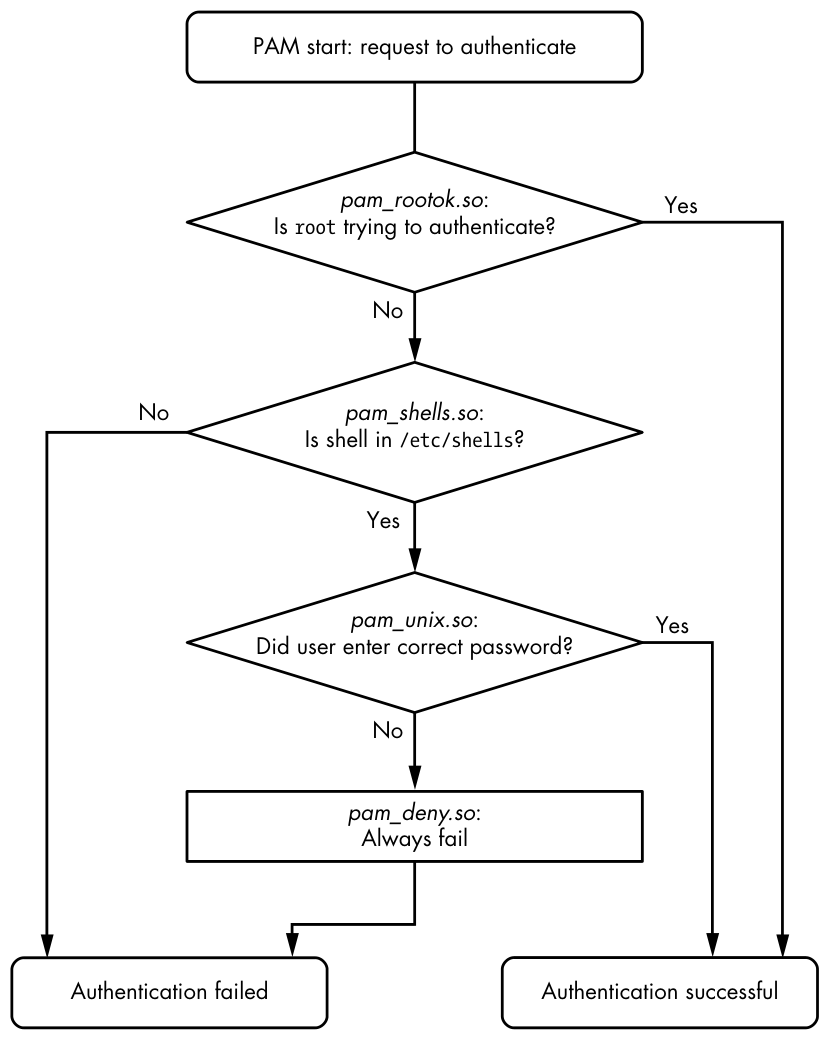
- The pam_shells.so module checks to see if the user’s shell is listed in /etc/shells. If it’s not there, the module returns failure, and the
requisitep. 196 control argument indicates that PAM must immediately report this failure back tochshand attempt no further authentication. Otherwise, the module returns success and fulfills the control flag ofrequisite; proceed to step 3. - The pam_unix.so module asks the user for their password and checks it. The control argument is set to
sufficient, so success from this module (a correct password) is enough for PAM to report success tochsh. If the password is incorrect, PAM continues to step 4. - The pam_deny.so module always fails, and because the control argument is set to
required, PAM reports failure back tochsh. This is a default for when there’s nothing left to try. (Note that arequiredcontrol argument doesn’t cause PAM to fail its function immediately—it will run any lines left on its stack—but PAM will always report failure back to the application.)
Don’t confuse the terms function and action when working with PAM. The function is the high-level goal: what the user application wants PAM to do (authenticate a user, for example). An action is a specific step that PAM takes in order to reach that goal. Just remember that the user application invokes the function first and that PAM takes care of the particulars with actions.
The advanced control argument syntax, denoted inside square brackets ([]), allows you to manually control a reaction based on the specific return value of the module (not just success or failure). For details, see the pam.conf(5) manual page; when you understand the simple syntax, you’ll have no trouble with the advanced syntax.
Module Arguments
PAM modules can take arguments after the module name. You’ll often encounter this example with the pam_unix.so module:
auth sufficient pam_unix.so nullok
The nullok argument here says that the user can have no password (the default would be failure if the user has no password).
7.10.2 Tips on PAM Configuration Syntax
Due to its control flow capability and module argument syntax, the PAM configuration syntax has many features of a programming language and a certain degree of power. We’ve only scratched the surface so far, but here are a few more tips on PAM:
- To find out which PAM modules are present on your system, try
man -k pam_(note the underscore). It can be difficult to track down the location of modules. Try thelocate pam_unix.socommand and see where that leads you. p. 197 - The manual pages contain the functions and arguments for each module.
- Many distributions automatically generate certain PAM configuration files, so it may not be wise to change them directly in /etc/pam.d. Read the comments in your /etc/pam.d files before editing them; if they’re generated files, the comments will tell you where they came from.
- The /etc/pam.d/other configuration file defines the default configuration for any application that lacks its own configuration file. The default is often to deny everything.
- There are different ways to include additional configuration files in a PAM configuration file. The
@includesyntax loads an entire configuration file, but you can also use a control argument to load only the configuration for a particular function. The usage varies among distributions. - PAM configuration doesn’t end with module arguments. Some modules can access additional files in /etc/security, usually to configure per-user restrictions.
7.10.3 PAM and Passwords
Due to the evolution of Linux password verification over the years, there are a number of password configuration artifacts that can cause confusion at times. The first to be aware of is the file /etc/login.defs. This is the configuration file for the original shadow password suite. It contains information about the encryption algorithm used for the /etc/shadow password file, but it’s rarely used on a system with PAM installed, because the PAM configuration contains this information. This said, the encryption algorithm in /etc/login.defs should match the PAM configuration in the rare case that you run into an application that doesn’t support PAM.
Where does PAM get its information about the password encryption scheme? Remember that there are two ways for PAM to interact with passwords: the auth function (for verifying a password) and the password function (for setting a password). It’s easiest to track down the password-setting parameter. The best way is probably just to grep it:
$ grep password.*unix /etc/pam.d/*
The matching lines should contain pam_unix.so and look something like this:
password sufficient pam_unix.so obscure sha512
The arguments obscure and sha512 tell PAM what to do when setting a password. First, PAM checks to see if the password is “obscure” enough (that is, the password isn’t too similar to the old password, among other things), and then PAM uses the SHA512 algorithm to encrypt the new password.
But this happens only when a user sets a password, not when PAM is verifying a password. So how does PAM know which algorithm to use when authenticating? Unfortunately, the configuration won’t tell you anything; there are no encryption arguments for pam_unix.so for the auth function. The manual pages also tell you nothing.
It turns out that (as of this writing) pam_unix.so simply tries to guess the algorithm, usually by asking the libcrypt library to do the dirty work of trying a whole bunch of things until something works or there’s nothing left to try. Therefore, you normally don’t have to worry about the verification encryption algorithm.