2.19 Linux Directory Hierarchy Essentials
Now that you know how to examine files, change directories, and read manual pages, you’re ready to start exploring your system files and directories. The details of the Linux directory structure are outlined in the Filesystem Hierarchy Standard, or FHS (https://refspecs.linuxfoundation.org/fhs.shtml), but a brief walkthrough should suffice for now.
Figure 2-2 offers a simplified overview of the hierarchy, showing some of the directories under /, /usr, and /var. Notice that the directory structure under /usr contains some of the same directory names as /.
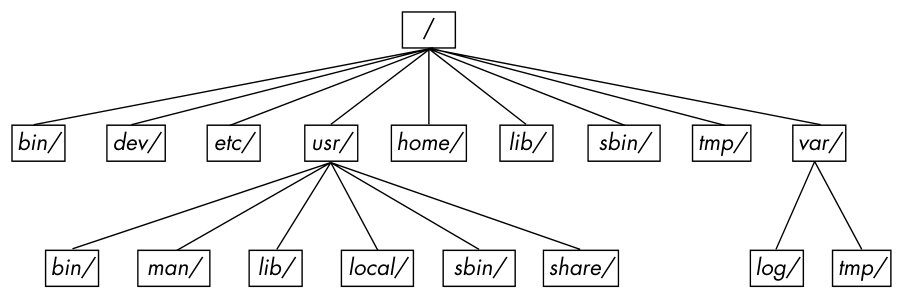
Here are the most important subdirectories in root:
/bin Contains ready-to-run programs (also known as executables), including most of the basic Unix commands such as ls and cp. Most of the programs in /bin are in binary format, having been created by a C compiler, but some are shell scripts in modern systems.
/dev Contains device files. You’ll learn more about these in Chapter 3.
/etc This core system configuration directory (pronounced EHT-see) contains the user password, boot, device, networking, and other setup files.
/home Holds home (personal) directories for regular users. Most Unix installations conform to this standard.
/lib An abbreviation for library, this directory holds library files containing code that executables can use. There are two types of libraries: static and shared. The /lib directory should contain only shared libraries, but other lib directories, such as /usr/lib, contain both varieties as well as other auxiliary files. (We’ll discuss shared libraries in more detail in Chapter 15.)
/proc Provides system statistics through a browsable directory-and-file interface. Much of the /proc subdirectory structure on Linux is unique, but many other Unix variants have similar features. The /proc directory contains information about currently running processes as well as some kernel parameters.
/run Contains runtime data specific to the system, including certain process IDs, socket files, status records, and, in many cases, system logging. This is a relatively recent addition to the root directory; in older systems, you can find it in /var/run. On newer systems, /var/run is a symbolic link to /run.
/sys This directory is similar to /proc in that it provides a device and system interface. You’ll read more about /sys in Chapter 3.
/sbin The place for system executables. Programs in /sbin directories relate to system management, so regular users usually do not have /sbin components in their command paths. Many of the utilities found here don’t work if not run as root.
/tmp A storage area for smaller, temporary files that you don’t care much about. Any user may read to and write from /tmp, but the user may not have permission to access another user’s files there. Many programs use this directory as a workspace. If something is extremely important, don’t put it in /tmp because most distributions clear /tmp when the machine boots and some even remove its old files periodically. Also, don’t let /tmp fill up with garbage because its space is usually shared with something critical (the rest of /, for example).
/usr Although pronounced “user,” this subdirectory has no user files. Instead, it contains a large directory hierarchy, including the bulk of the Linux system. Many of the directory names in /usr are the same as those in the root directory (like /usr/bin and /usr/lib), and they hold the same type of files. (The reason that the root directory does not contain the complete system is primarily historic—in the past, it was to keep space requirements low for the root.)
/var The variable subdirectory, where programs record information that can change over the course of time. System logging, user tracking, caches, and other files that system programs create and manage are here. (You’ll notice a /var/tmp directory here, but the system doesn’t wipe it on boot.)
2.19.1 Other Root Subdirectories
There are a few other interesting subdirectories in the root directory:
/boot Contains kernel boot loader files. These files pertain only to the very first stage of the Linux startup procedure, so you won’t find information about how Linux starts up its services in this directory. See Chapter 5 for more about this.
/media A base attachment point for removable media such as flash drives that is found in many distributions.
/opt This may contain additional third-party software. Many systems don’t use /opt.
2.19.2 The /usr Directory
The /usr directory may look relatively clean at first glance, but a quick look at /usr/bin and /usr/lib reveals that there’s a lot here; /usr is where most of the user-space programs and data reside. In addition to /usr/bin, /usr/sbin, and /usr/lib, /usr contains the following:
/include Holds header files used by the C compiler.
/local Is where administrators can install their own software. Its structure should look like that of / and /usr.
/man Contains manual pages.
/share Contains files that should work on other kinds of Unix machines with no loss of functionality. These are usually auxiliary data files that programs and libraries read as necessary. In the past, networks of machines would share this directory from a file server, but today a share directory used in this manner is rare because there are no realistic space restraints for these kinds of files on contemporary systems. Instead, on Linux distributions, you’ll find /man, /info, and many other subdirectories here because it is an easily understood convention.
2.19.3 Kernel Location
On Linux systems, the kernel is normally a binary file /vmlinuz or /boot/vmlinuz. A boot loader loads this file into memory and sets it in motion when the system boots. (You’ll find details on the boot loader in Chapter 5.)
Once the boot loader starts the kernel, the main kernel file is no longer used by the running system. However, you’ll find many modules that the kernel loads and unloads on demand during the course of normal system operation. Called loadable kernel modules, they are located under /lib/modules.