15.2 make
A program that has more than one source code file or requires strange compiler options is too cumbersome to compile by hand. This problem has been around for years, and the traditional Unix compile management utility that addresses it is called make. You should know a little about make if you’re running a Unix system, because system utilities sometimes rely on make to operate. However, this chapter is only the tip of the iceberg. There are entire books on make, such as Managing Projects with GNU Make, 3rd edition, by Robert Mecklenburg (O’Reilly, 2005). In addition, most Linux packages are built using an additional layer around make or a similar tool. There are many build systems out there; we’ll look at one named autotools in Chapter 16.
make is a big system, but it’s not very difficult to get an idea of how it works. When you see a file named Makefile or makefile, you know that you’re dealing with make. (Try running make to see if you can build anything.)
The basic idea behind make is the target, a goal that you want to achieve. A target can be a file (a .o file, an executable, and so on) or a label. In addition, some targets depend on other targets; for instance, you need a complete set of .o files before you can link your executable. These requirements are called dependencies.
To build a target, make follows a rule, such as one specifying how to go from a .c source file to a .o object file. make already knows several rules, but you can customize them to create your own.
15.2.1 A Sample Makefile
Building on the example files in Section 15.1.1, the following very simple Makefile builds a program called myprog from aux.c and main.c:
❶ # object files
❷ OBJS=aux.o main.o

❸ all: ❹myprog

myprog: ❺$(OBJS)
        ❻$(CC) -o myprog $(OBJS)
The # in the first line of this Makefile ❶ denotes a comment.
The next line is just a macro definition that sets the OBJS variable to two object filenames ❷. This will be important later. For now, take note of how you define the macro and also how you reference it later ($(OBJS)).
The next item in the Makefile contains its first target, all ❸. The first target is always the default, the target that make wants to build when you run make by itself on the command line.
The rule for building a target comes after the colon. For all, this Makefile says that you need to satisfy something called myprog ❹. This is the first dependency in the file; all depends on myprog. Note that myprog can be an actual file or the target of another rule. In this case, it’s both (the rule for all and the target of OBJS).
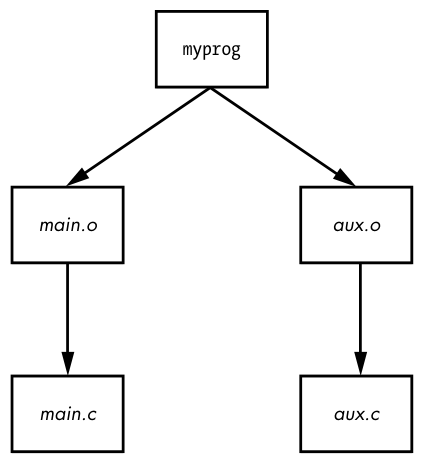
To build myprog, this Makefile uses the macro $(OBJS) in the dependencies ❺. The macro expands to aux.o and main.o, indicating that myprog depends on these two files (they must be actual files, because there aren’t any targets with those names anywhere in the Makefile).
The whitespace before $(CC) ❻ is a tab. make is very strict about tabs.
This Makefile assumes that you have two C source files named aux.c and main.c in the same directory. Running make on the Makefile yields the following output, showing the commands that make is running:
$ make
cc    -c -o aux.o aux.c
cc    -c -o main.o main.c
cc -o myprog aux.o main.o
A diagram of the dependencies is shown in Figure 15-1.
15.2.2 Built-in Rules
How did make know how to go from aux.c to aux.o? After all, aux.c is not in the Makefile. The answer is that make has some built-in rules to follow. It knows to look for a .c file when you want a .o file, and furthermore, it knows how to run cc -c on that .c file to get to its goal of creating a .o file.
15.2.3 Final Program Build
The final step in getting to myprog is a little tricky, but the idea is clear enough. After you have the two object files in $(OBJS), you can run the C compiler according to the following line (where $(CC) expands to the compiler name):
$(CC) -o myprog $(OBJS)
As mentioned earlier, the whitespace before $(CC) is a tab. You must insert a tab before any system command, on its own line.
Watch out for this:
Makefile:7: *** missing separator. Stop.
An error like this means that the Makefile is broken. The tab is the separator, and if there is no separator or there’s some other interference, you’ll see this error.
15.2.4 Dependency Updates
One last make fundamental concept to know is that, in general, the goal is to bring targets up to date with their dependencies. Furthermore, it’s designed to take only the minimum steps necessary to do that, which can lead to considerable time savings. If you type make twice in a row for the preceding example, the first command builds myprog, but the second yields this output:
make: Nothing to be done for 'all'.
This second time through, make looked at its rules and noticed that myprog already exists, so it didn’t build myprog again because none of the dependencies had changed since the last time you built it. To experiment with this, do the following:
- Run
touch aux.c. - Run
makeagain. This time,makedetermines that aux.c is newer than the aux.o already in the directory, so it compiles aux.o again. myprogdepends on aux.o, and now aux.o is newer than the preexistingmyprog, somakemust createmyprogagain.
This type of chain reaction is very typical.
15.2.5 Command-Line Arguments and Options
You can get a great deal of mileage out of make if you know how its command-line arguments and options work.
One of the most useful options is to specify a single target on the command line. For the preceding Makefile, you can run make aux.o if you want only the aux.o file.
You can also define a macro on the command line. For example, to use the clang compiler, try:
$ make CC=clang
Here, make uses your definition of CC instead of its default compiler, cc. Command-line macros come in handy for testing preprocessor definitions and libraries, especially with the CFLAGS and LDFLAGS macros that we’ll discuss shortly.
In fact, you don’t even need a Makefile to run make. If built-in make rules match a target, you can just ask make to try to create the target. For example, if you have the source to a very simple program called blah.c, try make blah. The make run proceeds like this:
$ make blah
cc   blah.o   -o blah
This use of make works only for the most elementary C programs; if your program needs a library or special include directory, you should probably write a Makefile. Running make without a Makefile is actually most useful when you’re dealing with something like Fortran, Lex, or Yacc and don’t know how the compiler or utility works. Why not let make try to figure it out for you? Even if make fails to create the target, it will probably still give you a pretty good hint as to how to use the tool.
Two make options stand out from the rest:
-n Prints the commands necessary for a build but prevents make from actually running any commands
-f file Tells make to read from file instead of Makefile or makefile
15.2.6 Standard Macros and Variables
make has many special macros and variables. It’s difficult to tell the difference between a macro and a variable, but here the term macro is used to mean something that usually doesn’t change after make starts building targets.
As you saw earlier, you can set macros at the start of your Makefile. These are the most common macros:
CFLAGS C compiler options. When creating object code from a .c file, make passes this as an argument to the compiler.
LDFLAGS Like CFLAGS, but these options are for the linker when creating an executable from object code.
LDLIBS If you use LDFLAGS but don’t want to combine the library name options with the search path, put the library name options in this file.
CC The C compiler. The default is cc.
CPPFLAGS C preprocessor options. When make runs the C preprocessor in some way, it passes this macro’s expansion on as an argument.
CXXFLAGS GNU make uses this for C++ compiler flags.
A make variable changes as you build targets. Variables begin with a dollar sign ($). There are several ways to set variables, but some of the most common variables are automatically set inside target rules. Here’s what you might see:
$@ When inside a rule, this variable expands to the current target.
$< When inside a rule, this variable expands to the first dependency of the target.
$* This variable expands to the basename or stem of the current target. For example, if you’re building blah.o, this expands to blah.
Here’s an example illustrating a common pattern—a rule using myprog to generate a .out file from a .in file:
.SUFFIXES: .in
.in.out: $<
        myprog $< -o $*.out
You’ll encounter a rule such as .c.o: in many Makefiles defining a customized way of running the C compiler to create an object file.
The most comprehensive list of make variables on Linux is the make info manual.
Keep in mind that GNU make has many extensions, built-in rules, and features that other variants do not have. This is fine as long as you’re running Linux, but if you step off onto a Solaris or BSD machine and expect the same options to work, you might be in for a surprise. However, that’s the problem that a multiplatform build system such as GNU autotools is designed to solve.
15.2.7 Conventional Targets
Most developers include several additional common targets in their Makefiles that perform auxiliary tasks related to compiles:
clean The clean target is ubiquitous; a make clean usually instructs make to remove all of the object files and executables so that you can make a fresh start or pack up the software. Here’s an example rule for the myprog Makefile:
clean:
        rm -f $(OBJS) myprog
distclean A Makefile created by way of the GNU autotools system always has a distclean target to remove everything that wasn’t part of the original distribution, including the Makefile. You’ll see more of this in Chapter 16. On very rare occasions, you might find that a developer opts not to remove the executable with this target, preferring something like realclean instead.
install This target copies files and compiled programs to what the Makefile thinks is the proper place on the system. This can be dangerous, so always run a make -n install to see what will happen before you actually run any commands.
test or check Some developers provide test or check targets to make sure that everything works after performing a build.
depend This target creates dependencies by calling the compiler with -M to examine the source code. This is an unusual-looking target because it often changes the Makefile itself. This is no longer common practice, but if you come across some instructions telling you to use this rule, make sure to do so.
all As mentioned earlier, this is commonly the first target in the Makefile. You’ll often see references to this target instead of an actual executable.
15.2.8 Makefile Organization
Even though there are many different Makefile styles, most programmers adhere to some general rules of thumb. For one, in the first part of the Makefile (inside the macro definitions), you should see libraries and includes grouped according to package:
MYPACKAGE_INCLUDES=-I/usr/local/include/mypackage
MYPACKAGE_LIB=-L/usr/local/lib/mypackage -lmypackage

PNG_INCLUDES=-I/usr/local/include
PNG_LIB=-L/usr/local/lib -lpng
Each type of compiler and linker flag often gets a macro like this:
CFLAGS=$(CFLAGS) $(MYPACKAGE_INCLUDES) $(PNG_INCLUDES)
LDFLAGS=$(LDFLAGS) $(MYPACKAGE_LIB) $(PNG_LIB)
Object files are usually grouped according to executables. For example, say you have a package that creates executables called boring and trite. Each has its own .c source file and requires the code in util.c. You might see something like this:
UTIL_OBJS=util.o

BORING_OBJS=$(UTIL_OBJS) boring.o
TRITE_OBJS=$(UTIL_OBJS) trite.o

PROGS=boring trite
The rest of the Makefile might look like this:
all: $(PROGS)

boring: $(BORING_OBJS)
        $(CC) -o $@ $(BORING_OBJS) $(LDFLAGS)

trite: $(TRITE_OBJS)
        $(CC) -o $@ $(TRITE_OBJS) $(LDFLAGS)
You could combine the two executable targets into one rule, but it’s usually not a good idea to do so because you wouldn’t easily be able to move a rule to another Makefile, delete an executable, or group executables differently. Furthermore, the dependencies would be incorrect: if you had just one rule for boring and trite, trite would depend on boring.c, boring would depend on trite.c, and make would always try to rebuild both programs whenever you changed one of the two source files.
If you need to define a special rule for an object file, put the rule for the object file just above the rule that builds the executable. If several executables use the same object file, put the object rule above all of the executable rules.